

How Postbacks Work
Server-to-Server (S2S) postbacks are HTTP webhooks sent from Perkox to your backend server whenever a user completes an offer. This allows your backend to credit user balances securely without trusting client-side app execution.
Click to expand
Setup Steps
1Create an Endpoint on Your Server
Create an HTTPS route on your server (e.g. https://api.yourdomain.com/perkox/postback) that listens for incoming GET or POST requests.
2Configure Postback URL in Publisher Portal
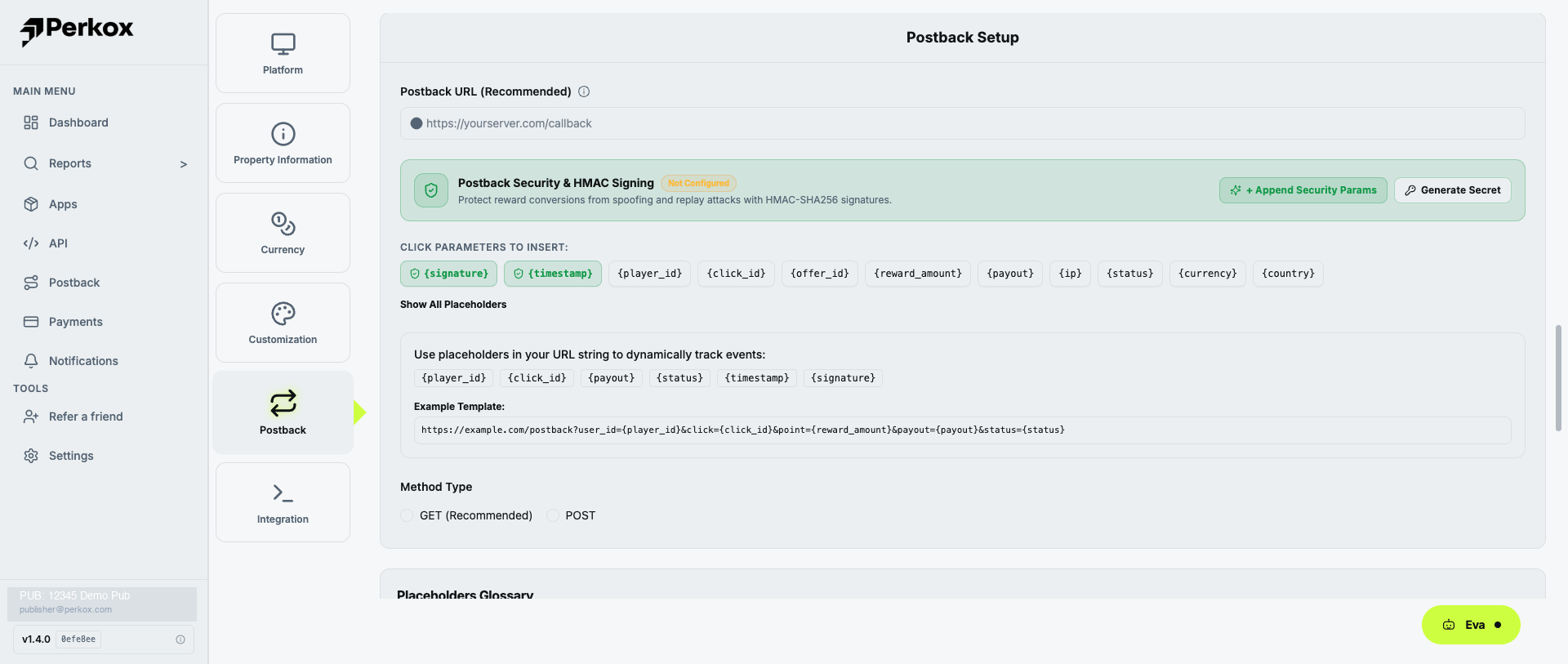
Go to Postback in the left menu, or click Postback in your App settings. Paste your URL containing dynamic macro placeholders:
https://api.yourdomain.com/perkox/postback?user_id={player_id}&amount={reward_amount}&payout={payout}&click_id={click_id}&conversion_id={conversion_id}&status={status}&sig={signature}3Return HTTP 200 OK
When receiving a valid postback, your server must respond with an HTTP status code of 200 (e.g. responding with plain text OK or JSON {"status":"success"}). Any non-200 status code triggers automatic retries.
Secure Your Postbacks
Always enable HMAC signature authentication to verify that postbacks genuinely originate from Perkox and have not been tampered with. See Postback Security & HMAC.